








|
|
|
|
|
|
|
|
|
|
|
|

 HomeDownloadScreenshotsAnonymity CheckContact / ForumHelp & FAQLegal Notice HomeDownloadScreenshotsAnonymity CheckContact / ForumHelp & FAQLegal Notice Support AN.ON!Payment ServiceCrime PreventionAbuseSurvey Support AN.ON!Payment ServiceCrime PreventionAbuseSurvey HelpMix Config ToolVoluntary Commitment HelpMix Config ToolVoluntary Commitment DocumentationRecent publicationsPress DocumentationRecent publicationsPress RoadmapsBugtrackingSource CodesCompiled Binaries RoadmapsBugtrackingSource CodesCompiled Binaries
|
|
Proxy settings: KonquerorJonDos recommends the preconfigured, portable JonDoFox for secure anonymous web browsing. It is available as a a Firefox profile for all operating systems. To set up JonDo for Konqueror instead, do the following: 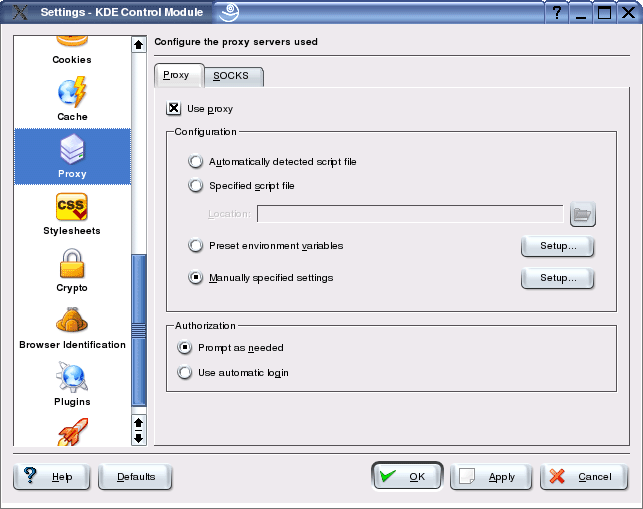 2.) Under the "Proxy" tab, select the radio button "Manually specified settings". 3.) Click on the "Setup" button next to "Manually specified settings". Under "HTTP", enter the server address "http://127.0.0.1" and the port "4001". Then toggle the "Use same proxy server for all protocols" checkbox to use JonDo for all other protocols as well. 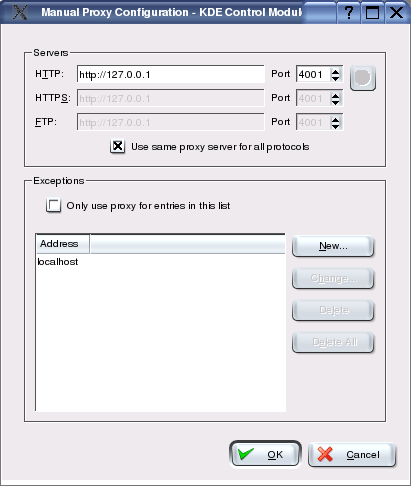 If you want to specify addresses where JonDo shall not be used, you can enter those exceptions into the field Exceptions, separated by commas. Note: If you set a different listen port in JonDo, you'll have to enter this port here too, rather than "4001".
| |
|
||||||||||||||
|
Top
|
|
© 2000-2011
JAP Team
|
|
|||||||||||||||
|
||||||||||||||||||

 Alternative browsers